

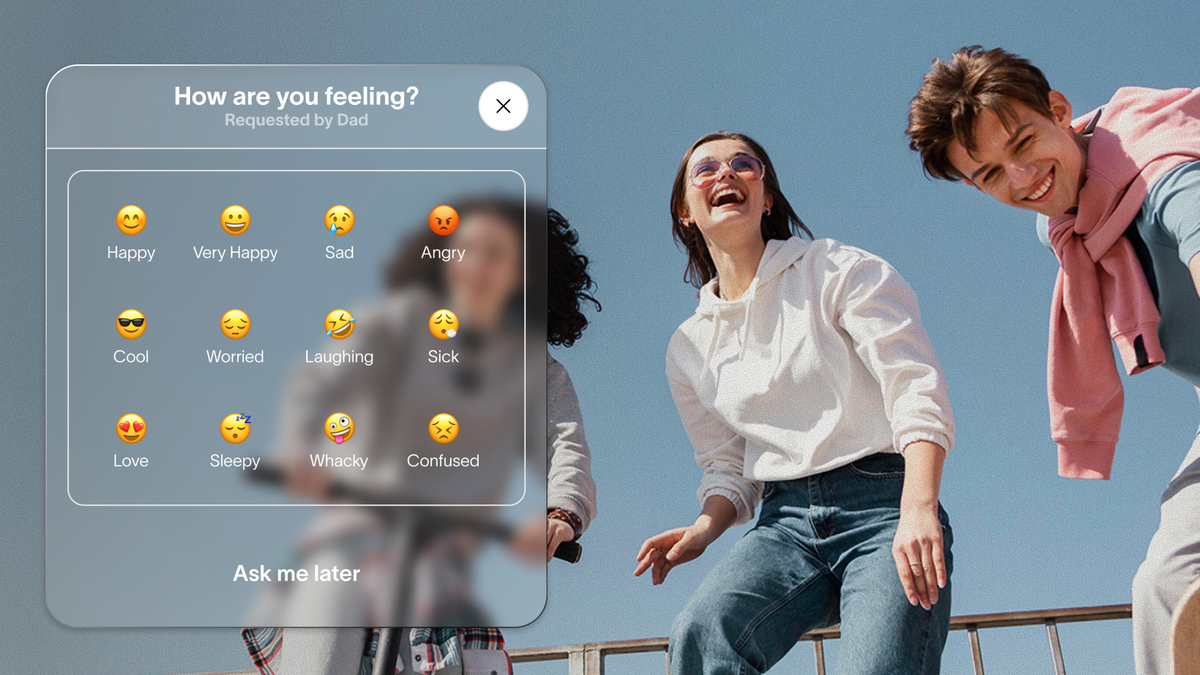
You know where your kid is. The map in the Spacetalk App tells you that in seconds. What it doesn't tell you, at least not on its own, is how they're actually doing today. That's the gap Spacetalk's Feelings check-ins are built to close.
A Check-In is a single tap from your kid's smart watch that tells you how they feel right now. Paired with knowing where they are, it turns a standard parental monitoring app into something closer to an ongoing, low-pressure conversation.
Let's walk through what a Check-In actually asks, why feelings matter alongside location, and how to send your family's first one today.
A Check-In is simpler than it sounds. Your kid taps the Feelings icon on their Spacetalk Watch, a row of emojis pops up, and they pick the one that matches how they're feeling. No typing. No long form. No explaining themselves if they don't want to.
Once they've picked an emoji, it sends straight through to the Spacetalk App, where you can see it under Track Wellness on their profile. This sits inside the Feelings tab specifically, alongside Steps and Heart Rate, and it's exclusive to the Spacetalk Adventurer 2. The Spacetalk Loop doesn't carry it.
You don't have to wait for your kid to send one on their own, either. Here's how a Check-In can start from either side:
The emoji selection covers a proper range rather than just a single happy or sad face, so your kid can pick something closer to how the day actually went instead of rounding up or down to an extreme.
Turning the feature on takes one step. Open Watch Settings in the app, find Feelings, and toggle it on. Nothing comes through until you do.

Knowing where your kid is answers one question. Knowing how they feel answers a completely different one, and most tracking tools only ever ask the first.
A location pin can look exactly the same on a great day and a terrible one. Your kid might be standing at footy training either way, and the map won't tell you which it was. Feelings check-ins fill that blind spot by giving you a second, emotional data point to sit next to the first.
This matters more as kids get older and talk less about their day without being asked. A few small things a Check-In habit can surface over time:
None of this replaces an actual conversation. What it does is give you a reason to start one, which is the whole point of pairing feelings with location in a parental monitoring app built around connection rather than just coordinates.
This is also where Spacetalk's wider setup shows its value. Spaces, Places, and Check-Ins are built to sit together rather than as separate tools, so you're never relying on a single feature to tell you the whole story about your kid's day.

One low-mood emoji probably doesn't mean much. A pattern of them is worth a conversation.
The Feelings tab in the Spacetalk App keeps a scrollable calendar of everything your kid has sent, so you're not relying on memory to spot a trend. If you notice three or four flat days in a row, that's your cue, not a diagnosis.
Ask them about it directly, in person if you can, rather than only replying through Chat. A few ways to open that conversation without making it feel like an interrogation:
Spacetalk's Feelings feature was never built to replace a proper conversation, a teacher's observation, a GP's visit, or your own judgment if you're genuinely worried.
It's built to make sure a quiet kid still has a low-effort way to tell you something's off, even on days they don't feel like explaining it out loud.
Getting started takes less time than reading this sentence twice.
From there, you can request a Check-In any time it suits, whether that's after a big exam, the first day at a new school, a rough week with friends, or just a regular Tuesday where you want to know how the day went.
It only takes your kid a few seconds to answer, and it gives you more than a basic parental monitoring app that only ever shows you a dot on a map. You get the dot, plus a sense of how they're carrying the day, which is really what peace of mind is supposed to feel like.

Explore Spacetalk
Smartwatch · Kids
Spacetalk Adventurer 2
A single tap from your kid's smart watch that tells you how they feel right now.
Shop nowA Check-In is a one-tap emoji update your kid sends from their Spacetalk Watch to tell you how they're feeling. It lands in the Feelings tab of the Spacetalk App, where you can scroll back through a calendar of past entries. You can also request one directly from your side if they haven't sent one in a while.
Yes. Spacetalk works as a parental monitoring app for both, showing you where your kid is and, through Feelings check-ins, how they're doing emotionally. The two sit in separate tabs in the app, so you can check either one on its own or look at both together.
They can help you notice a pattern, which is often the first sign something needs a closer look. A string of low-mood emojis isn't proof of a problem, but it's a reasonable prompt to ask your kid directly how they're going. Treat it as a conversation starter rather than a diagnosis.
Love keeping up with Spacetalk?
Add us as your preferred source on Google and never miss a new post, product update or parenting tip.
Jaa:
How Kid-Safe Video Calling Works Inside the Spacetalk App
How to Find Your Kid's Location Using the Spacetalk App