

Moving From a Spacetalk Watch to a Spacetalk Mobile Plan: When Is It Time?
- kirjoittaja Craig Boshier
Key Takeaways
- Moving from smartwatch to phone isn't a single decision made on a birthday.
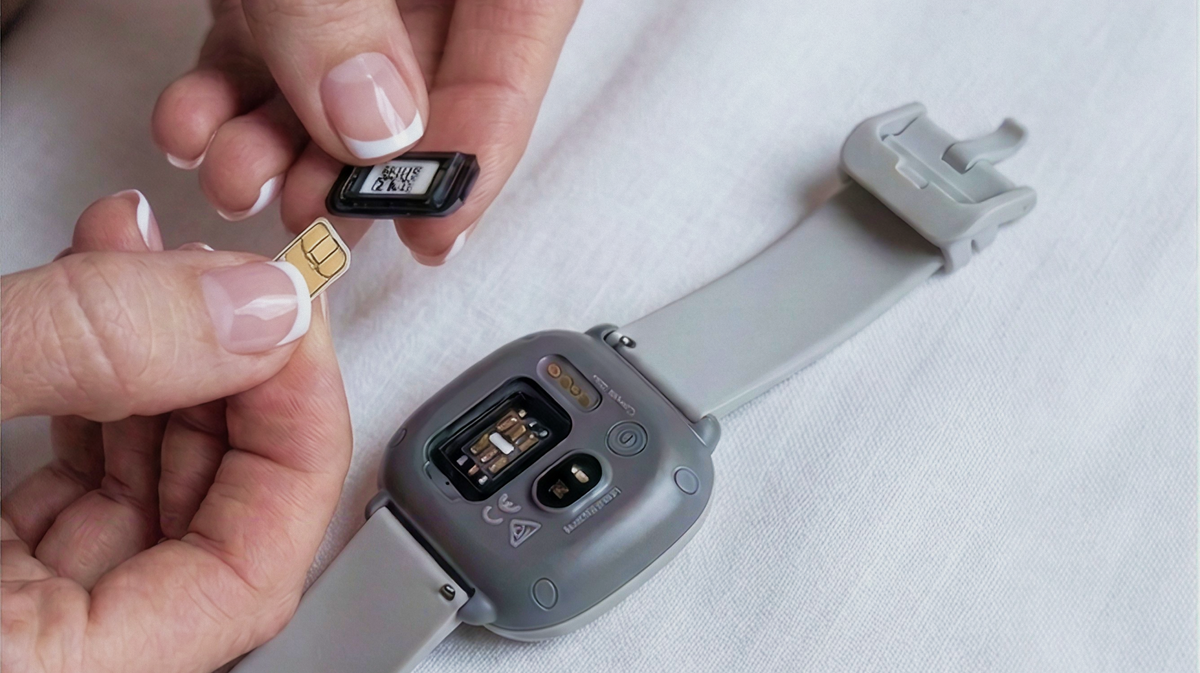
- In many cases, the same nano SIM from the watch can move straight into the new phone, rather than ordering a brand new SIM and setting up a fresh number from scratch.
- Your kid's number, their place in your Space, and their Trusted Contacts all carry over, none of it needs rebuilding from zero.
- Places keeps working the same way on a phone as it did on the watch, so arrival and departure alerts don't disappear along with the upgrade.
- There's no need to rush the switch just because a phone is technically an option.
Moving from smartwatch to phone isn't a single decision made on a birthday. It's usually a handful of small signs adding up over a few months, a comment about missing a group chat, a longer trip across town on their own, an older cousin's hand-me-down phone sitting on the kitchen bench with nothing to do. By the time you notice the pattern, the switch has usually already started making sense on its own.
When They Start Outgrowing the Watch
A watch that used to cover everything can start to feel limited as a kid's life gets busier and their plans get less predictable. It's not that the watch stops doing its job. It's that their world gets bigger than what a watch was ever built for, group chats with half the soccer team, homework sorted out over messages after school, the occasional need to send a photo rather than just a quick voice note home.
None of that happens overnight. It tends to creep in over a term or two, until one day you realise the watch is handling maybe half of what your kid actually needs from a device.
Signs They're Ready for the Next Step
They're Travelling Further on Their Own
Public transport, longer trips to sport, or getting themselves to more places without a parent nearby are all signs a SIM transition to a full phone plan might suit their day better. A watch is brilliant for the walk to school or the park down the road. It starts to feel a bit stretched once the trip involves a train change, a friend's house on the other side of the suburb, or training that finishes late and needs a proper back-and-forth about who's picking up.

Their Plans Change Faster Than a Watch Can Keep Up With
If plans with friends are shifting last-minute in group chats a watch can't really participate in, that's a sign a phone might suit them better than it used to. Kids' social plans move fast these days. "Meet at the shops" becomes "actually let's do the park" becomes "mum's picking us up early" inside twenty minutes, sorted across a thread with five people typing at once. A watch can send a message. It was never built to keep pace with that kind of chat.
They're Ready to Use a Phone With Their Own Mobile Plan
Sometimes it's simpler than any of that: your kid already has, or is getting, a smartphone, and a kids first phone plan needs to go with it. No dramatic sign required, just a phone that needs a working number and a data allowance behind it, and a parent who'd rather not hand over an unmanaged SIM to sort that out.

How the Move From a Watch to a Mobile Plan Works
Keeping the Same Physical SIM
In many cases, the same nano SIM from the watch can move straight into the new phone, rather than ordering a brand new SIM and setting up a fresh number from scratch. That matters more than it sounds. It means the number your kid's friends and teachers already have saved doesn't quietly change overnight, and you're not chasing down who needs the new digits.
Reactivating Through the Spacetalk App
Reactivating that SIM on a Mobile Plan is done through the Spacetalk App, the same place you already manage the rest of your family's settings. There's no separate account to create or new login to remember. A few taps switches the plan type over, and the SIM does the rest once it's sitting in the new handset.
What Carries Over and What's New
Your kid's number, their place in your Space, and their Trusted Contacts all carry over, none of it needs rebuilding from zero. What's new is the data allowance and the features that come with a full teen mobile plan rather than a Watch Plan, more data for actually using apps day to day, streaming, and everything else a phone gets used for that a watch was never asked to handle.

What Stays the Same for Your Family
Staying in the Same Space
Your kid doesn't leave the family's Space just because the device changed from a watch to a phone. They're still visible in the same app, sitting alongside everyone else in the family, not shuffled off into some separate setup because they've upgraded to a bigger device.
Still Getting Arrival Alerts From Places
Places keeps working the same way on a phone as it did on the watch, so arrival and departure alerts don't disappear along with the upgrade. If school, home and grandma's house were already set up as Places, they stay set up exactly as they were. Nothing needs re-entering, and nothing quietly drops off.
Choosing the Right Time to Make the Switch
There's no need to rush the switch just because a phone is technically an option. The signs above matter more than a specific birthday, and plenty of kids happily stay on a watch well past the age when a phone would fit their hand. Some families wait until high school starts. Others move earlier because one particular kid's life has already outgrown what a watch was ever meant to cover. Either approach is fine, as long as it's led by what your kid actually needs day to day rather than what age everyone else in the year group seems to be doing it at.

Learn About Spacetalk Mobile Plans
When the time is right, the switch is more straightforward than it sounds, no dramatic re-setup, just a plan change happening quietly behind the scenes. Learn about Spacetalk Mobile Plans before you make the move, so you know exactly what to expect once the moment actually arrives.
Explore Spacetalk
Built for exactly this
Plans · Family
Spacetalk Mobile Plan
More data for actually using apps day to day, streaming, and everything else a phone gets used for.
Shop nowApp · Family
Spacetalk App
The same place you already manage the rest of your family's settings.
Shop nowSmartwatch · Kids
Spacetalk Watch
Brilliant for the walk to school or the park down the road.
Shop nowFrequently Asked Questions
How do I move my kid from a watch to a phone?
The same SIM often moves from the watch into the new phone, and the plan is switched from a Watch Plan to a Mobile Plan through the Spacetalk App. There's usually no need to start a new contract or reissue a number.
Do I need a new SIM card to switch to a Mobile Plan?
Not necessarily. In many cases, the existing nano SIM can be reused in the new phone, though a new SIM can be ordered if needed, for instance, if the old one's been damaged or the new phone takes a different SIM size.
Will I still see their location after the switch?
Yes. Location awareness, Places and Find My Device continue working through the Spacetalk App once your kid is on a Mobile Plan on their own phone, so changing devices doesn't mean losing sight of where they are.
What happens to the Spacetalk Watch after the transition?
The watch itself can be passed down to a younger sibling, kept as a spare, or retired, once it's no longer needed as the primary device. Plenty of families find a second use for it rather than letting it sit in a drawer.
Love keeping up with Spacetalk?
Add us as your preferred source on Google and never miss a new post, product update or parenting tip.
Jaa:
Didn't Get the Gift You Hoped For? Buying It Yourself in the Boxing Day Sales
Didn't Get the Gift You Hoped For? Buying It Yourself in the Boxing Day Sales