

There is a useful middle ground between "my kid doesn't need a phone yet" and "I need to know they're safe when I'm not there." That is where a family-focused app can make a real difference.
The Spacetalk App is designed to give parents and carers control over communication, contacts, location sharing, and safety features while a kid uses a connected watch. In that sense, it can work as a parental control app before a child is ready for the broader access that comes with their own smartphone.
The important distinction is that this isn't about controlling every part of a kid's day. It is about giving parents practical tools to manage the parts that matter for safety and independence.
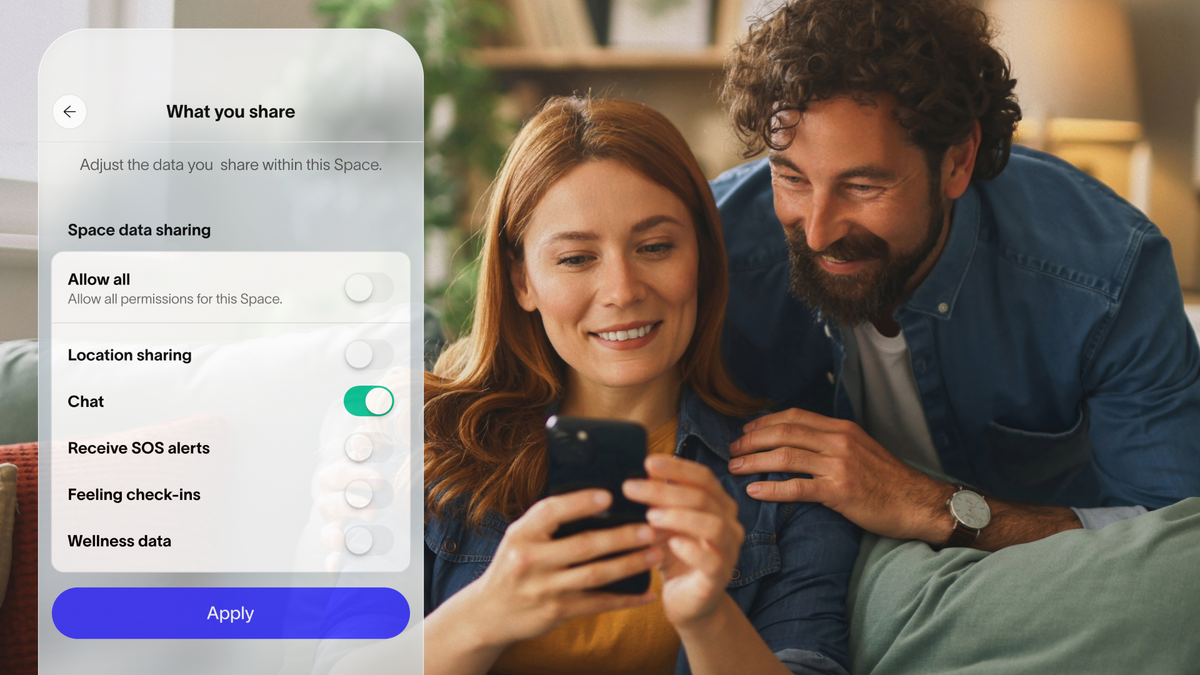
The Spacetalk App acts as the parent-led control centre for connected smart watches for kids and, where supported, family members using mobile devices. Parents can manage a kid's profile, device, Spaces, sharing settings, and other adults who can help manage the account.
Depending on the watch and active plan, parents can manage features including:
This makes the app particularly useful when a kid is becoming more independent but does not yet need their own smartphone.

The practical difference is straightforward:

Trusted contacts help keep communication within a family-approved circle rather than allowing unrestricted contact. Parents can also configure SOS contacts. The watch can contact up to three SOS contacts in priority order when the SOS function is activated.
School Mode provides another layer of control. Parents can schedule when it operates and choose which functions remain available. The watch is designed to be quiet during School Mode, while emergency communication can still be enabled according to the configuration.
For parents, this means the watch can be useful without becoming another classroom distraction.
A smartphone gives a kid access to far more than communication. Depending on the device and settings, that can include social media, browsers, app stores, games, and contact from people outside the family.
A connected kids' watch can provide the specific functions a family needs first: calling, messaging, location awareness and safety support.
The Spacetalk App keeps the parent or carer involved in managing that experience. For children under 13 in Australia, the account is managed on their behalf, including their profile, device, Spaces and what they share.
That can make sense during the stage when a kid is learning to manage small freedoms:
A parental monitoring app can therefore be most useful when it supports these specific moments rather than encouraging parents to constantly check where their child is.
The transition to a phone does not necessarily mean the family has to abandon the same approach to connection and safety. The Spacetalk App can also link a mobile to a managed profile. The current system allows a profile to use either a Spacetalk Watch or a mobile, rather than both at the same time.
That makes the technology relevant to a broader stage of growing independence. The key difference is the device itself. A phone can introduce considerably more functionality, while a watch can remain focused on family communication, location, and safety.
For parents, the decision about moving to a phone can therefore be based on what their kid needs next, rather than simply choosing a phone because they have reached a particular age.

The first setup is easiest when parents configure only the features they are likely to use. Start by creating the family Space, adding the relevant family members, and pairing the watch. The app allows parents to organise different groups through Spaces and control what managed kids share within them.
Then consider setting up:
This keeps the setup practical rather than overwhelming. The broader value of a parental control app at this stage is not having control for its own sake. It is having the right controls available while a kid learns to manage more of their own world.
A watch can provide the first layer of communication and safety; the app gives parents the ability to manage that experience. As a kid becomes ready for a phone, the family's needs can change too.

The aim is not to keep kids dependent. It is to give parents enough control and reassurance to let them become more independent, one step at a time.
Explore Spacetalk
App · Family
Spacetalk App
Contacts, location, Places, Routes, School Mode and SOS — managed from your phone.
Learn moreSmartwatch · Kids
Spacetalk Adventurer 2
4G calling, GPS, SOS, video calling and Chat — parent-managed through the app.
Shop nowSmartwatch · Kids
Spacetalk Loop
A simpler first watch with the same parent-managed safety essentials.
Shop nowParents and carers can manage a child's device, profile, Spaces, sharing settings and authorised adults. Depending on the connected device and plan, they can also configure contacts, location features, Places, Routes, School Mode and SOS settings.
For the watch's family-management functions, the Spacetalk App is the companion platform used to manage the device and connected family features. This means parents do not need a separate app simply to manage the watch's core communication, location, and safety functions. An active Spacetalk Watch Subscription or SIM plan is required for ongoing access to connected watch-to-app features.
There is no universal age. Parents should consider phone-based controls when a child begins using a smartphone and therefore gains access to features that go beyond the focused communication and safety functions of a kids' watch. The useful question is not simply "How old is my child?" but "What does my child now need to access independently?"
Yes. Parents can make calls from the app to a connected watch and send messages through the app. Video calling is also available between the app and an Adventurer watch.
Location awareness provides current location information, but the app does not represent location as an uninterrupted live video-style stream. The app shows when the location was last updated, helping parents understand how recent the information is.
Love keeping up with Spacetalk?
Add us as your preferred source on Google and never miss a new post, product update or parenting tip.
Share:
What to Look for in a Kids’ Smartwatch in Australia
How Can Kids Chat Safely via the Spacetalk Smartwatch with Parents and Friends?