

A first device for kids is still one gift, even when that kid has two homes and two parents making decisions separately for most of the year.
Maybe you talk every day, or maybe most of the coordination happens through a shared calendar and a handover bag left by the front door. Either way, a Spacetalk Watch is one of those gifts that touches both households at once, not just the one where it gets unwrapped on the day.
Co-parenting gifts like this work best with a little coordination up front, so the watch actually fits how your family runs day to day, rather than working smoothly at one house and causing confusion at the other.
A Spacetalk Watch touches both households by design, calls, Chat, Places, SOS, all of it. It's the kind of gift worth a short conversation between co-parents before the sale, rather than a surprise one parent finds out about after the fact, or worse, after it's already been set up a particular way. Nobody wants to be renegotiating Trusted Contacts on a Tuesday night because it never came up beforehand.
It's a bit different to buying, say, a bike or a board game, where the gift mostly just sits at whichever house it's kept. A watch is live at both addresses from the moment it's paired, which is exactly why it's worth ten minutes of planning rather than treating it like any other present under the tree.

A quick, practical conversation about what the watch is actually for, staying in touch, knowing they've arrived somewhere safely, having an SOS option if something goes wrong, helps both parents feel it's a shared decision rather than something sprung on them. It doesn't need to be a long discussion. Five minutes on the phone or a couple of texts back and forth is usually enough to land on the same page before money changes hands.
One parent usually ends up buying the watch and doing the initial setup in the Spacetalk App. That's fine, as long as the other parent is added into the Space from day one rather than added on as an afterthought a few weeks later. Whoever's holding the phone when the box gets opened will naturally do the heavy lifting on setup, and that's a reasonable division of labour, provided the other household isn't left locked out once it's done.
Both parents can be added as Trusted Contacts in the same Space, so calls, Chat and SOS alerts reach both households, not just the one that bought the watch. This matters more than it sounds on paper. If your kid presses SOS on a Wednesday afternoon at the other parent's house, you'll want to know about it too, not hear about it secondhand that evening.
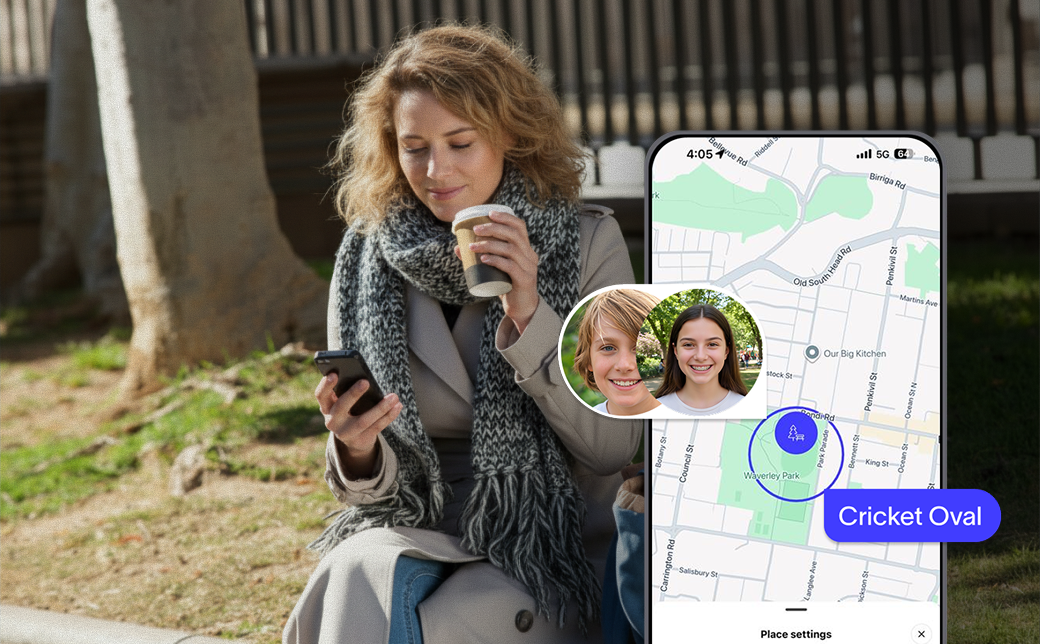
Places can be set for both homes, school, and anywhere else your kid spends regular time, sport, a grandparent's house, an after-school activity, so location awareness reflects the way your family actually operates across two addresses. There's no need to pick a "main" home and treat the other as an exception. Both addresses go in as Places, side by side, and the app treats them exactly the same way, so neither household ends up feeling like the secondary one on paper.
With both homes set as Places, arriving at either one triggers the same kind of arrival alert, so a handover day doesn't need a string of "they're on their way" texts between parents. Friday afternoon handovers are exactly the kind of moment this quietly takes care of, an arrival notification lands on both phones, and that's the confirmation, without either of you having to type it out.
For your kid, the watch works the same wherever they are. Trusted Contacts, Places and School Mode don't change house to house, which is part of what makes it a steadier first device for kids living across two homes. They're not learning two different sets of rules or wondering why the watch behaves differently at Dad's place versus Mum's. One Space, one set of settings, one experience, regardless of which bedroom their school bag is sitting in that week.
That consistency tends to matter more to kids than parents expect. A lot of the mental load of living across two homes falls on the kid, remembering which uniform's where, whose turn it is for pickup. A watch that behaves identically at both places is one less thing on that list.

A first device doesn't need to complicate co-parenting, and honestly, it's one of the easier gifts to get right across two homes, precisely because the setup lives in an app rather than in either house. Set it up once, add both parents in, and the Spacetalk App does the rest of the work of keeping both homes in the loop.
Explore Spacetalk
Smartwatch · Kids
Spacetalk Watch
A Spacetalk Watch touches both households by design, calls, Chat, Places, SOS, all of it.
Shop nowApp · Family
Spacetalk App
Set it up once, add both parents in, and the Spacetalk App does the rest of the work of keeping both homes in the loop.
Shop nowSafety · Family
SOS Alerts
Calls, Chat and SOS alerts reach both households, not just the one that bought the watch.
Shop nowYes. Both parents can be part of the same Space and added as Trusted Contacts, so both can see location awareness, receive SOS alerts and stay reachable through the app, whichever house your kid happens to be at that week.
Yes. Places can be set for both addresses along with school and any other regular locations, so arrivals and departures are tracked at either home, without one parent missing out on alerts the other one gets.
Whoever sets up the Space initially manages settings by default, but both parents can typically hold admin access, so decisions like School Mode times or the Trusted Contacts list don't rest with one household alone.
Love keeping up with Spacetalk?
Add us as your preferred source on Google and never miss a new post, product update or parenting tip.
Teilen:
Geschenkquittungen, Rückgaben und Umtausch bei Nichtgefallen: Kauf eines Geräts als Geschenk
One Sale, Two Gifts: A Watch for the Tween and a Mobile Plan for the Teen