

The first time your kid walks from the house to the school via school bus without you, the hardest part may not be letting go; it may be resisting the urge to ask, "Have you reached safely?"
That small moment is where technology can be useful without becoming intrusive. A kids' tracker watch can give parents a simple way to know when a kid has reached a familiar place, while still giving them the freedom to make that journey themselves.
But "GPS" on a watch can mean more than a dot moving across a map. With the right features, location awareness can become part of everyday family routines, from an arrival alert at school to an agreed Route home. Understanding how it actually works makes it easier to decide whether a connected watch is right for your family, and which features are genuinely worth having.

A Spacetalk Watch uses GPS-based location technology to determine its position and shares available location information with the Spacetalk App. Once it's paired with an active Spacetalk Watch Plan, that GPS connects over the 4G network to the Spacetalk App on your phone, and your kid's current position appears on a map. Parents can then view that information through the app rather than needing to repeatedly ask where their kid is.
This is what Spacetalk calls location awareness: you open the app, and you know. No calling to ask "where are you?", no waiting for a reply.
A few practical things worth knowing:
This works the same way across every Spacetalk Watch Loop or Adventurer 2. The difference between models is in screen size, camera, and battery, not in how location awareness itself functions.
If you're comparing watches by age, spec, or price, know that the core safety feature stays consistent regardless of which one you choose.
Whether you call it a kids' tracker watch or a kids' GPS watch, most parents want the same thing: to know the moment their kid gets somewhere, without checking the app every five minutes. That's what Places are for.
A place is a location you set inside the Spacetalk App home, school, grandma's house, the swimming pool. Once it's saved, the app tells you the moment your kid arrives or leaves, with no need to open the map and look.
Setting one up takes a few taps:

One Spacetalk dad puts the benefit simply: he can see when his teenage son has "arrived safely and when he's on the return journey- no more early trips to the car park just in case. That's the whole point of a place: it replaces checking with knowing.
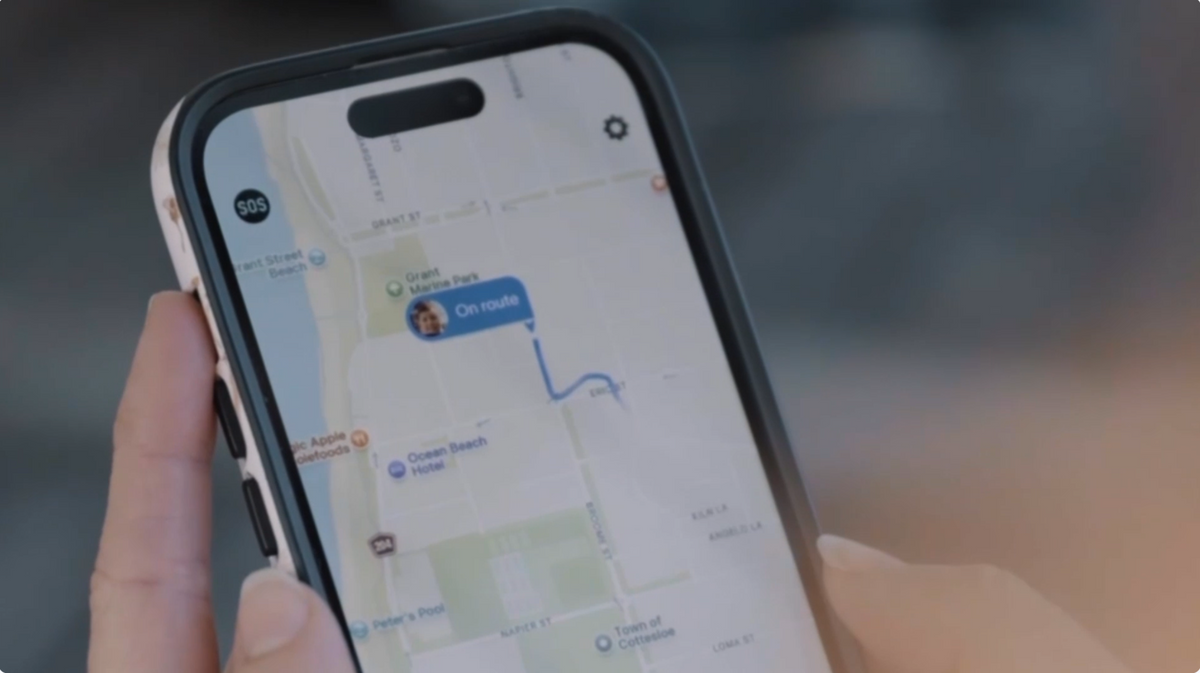
Places tell you when your kid arrives or leaves somewhere. Routes tell you what happens in between.
A route is a path between two places home and school, for instance that you set once inside the Spacetalk App. If your kid sticks to that path, you hear nothing, because nothing needs your attention. If they wander off it for longer than expected, you get an alert.

This is the feature that matters most for that first solo walk, cycle, or bus trip. It's not about watching every step. It's about being told only when something's actually different from the plan.
To set kids' watch with GPS:
Families tend to start with the school run, then add routes for other regular trips as their kid earns more independence: the sports club, a friend's house, the walk to the shops.
The Spacetalk position routes as a way to set safe paths for family members, while places provide alerts when family members arrive at or leave a location.
That distinction matters: Places are centred on destinations; Routes are centred on journeys.
Places and Routes solve two different everyday family needs.
| Feature | What it does | Example |
|---|---|---|
| Places | Helps families know when a member arrives at or leaves a familiar location | A kid arrives at school |
| Routes | Helps families establish an agreed path for a journey | A kid walks home from school |
For a younger kid who is beginning to spend short periods away from home, Places may be the more immediately useful feature.
For a tween who is becoming more confident travelling independently, Routes can add another layer of reassurance around regular journeys.
Both features are available through the Spacetalk App as part of its family safety functionality.
Location services require power, so using location-related features can contribute to battery consumption. However, battery performance is also influenced by factors such as mobile connectivity, calls, messages, and general watch usage.
There isn't one battery impact that applies to every family or every situation. Parents should therefore follow the manufacturer's charging and usage guidance rather than assuming that GPS alone determines how often the watch needs charging.
The practical takeaway is simple: if location awareness is an important part of your family's routine, keeping the watch adequately charged should be part of the normal daily routine.
There isn't one fixed update interval that applies in every situation. Location availability can vary according to factors such as connectivity and how the watch is being used.
The Spacetalk App provides location awareness so parents can check a connected family member's location when needed, while features such as Places can provide useful arrival and departure notifications.
This means parents don't necessarily need to keep opening the app throughout the day. The aim is to provide useful visibility without turning family connection into constant checking.
Setting up a Place gives parents a way to create location-based alerts around destinations that matter to their family. The exact app interface can change as the Spacetalk App is updated, but the process generally involves:
A useful first Place might be your kid's school. Once it is set up, an arrival notification can provide simple reassurance that they've reached school without requiring a call or message.
It is worth choosing Places that genuinely add value to your family's routine. You don't need to create one for every location your kid visits.
Explore Spacetalk
Smartwatch · Kids
Spacetalk Adventurer 2
GPS location awareness, Places, Routes, SOS and 4G video calling in one watch.
Shop nowSmartwatch · Kids
Spacetalk Loop
Same GPS, Places and Routes — a simpler first watch for younger kids.
Shop nowApp · Family
Spacetalk App
Location, Places, Routes, Chat and safety features — all managed from your phone.
Learn moreA kids' tracker watch combines location awareness with family-focused communication and safety features. A standard smartwatch may focus more heavily on apps, entertainment, or general wearable functionality.
GPS technology can determine location, but sharing that information with a parent through an app requires the watch to communicate with the mobile network. Spacetalk Watches use 4G connectivity for calls, texts, and location awareness.
No. Location awareness is one part of a broader family safety platform. Spacetalk Watches also support 4G calling and texts, Trusted Contacts, SOS, and School Mode, while the Spacetalk App brings features such as Spaces, Places, Routes, and Chat together in one place.
Love keeping up with Spacetalk?
Add us as your preferred source on Google and never miss a new post, product update or parenting tip.
Share:
Video Calling on the Adventurer 2: Seeing Your Child's Face, Not Just Their Location
Spacetalk Watches for Girls: Colours, Bands and Everyday Fit