

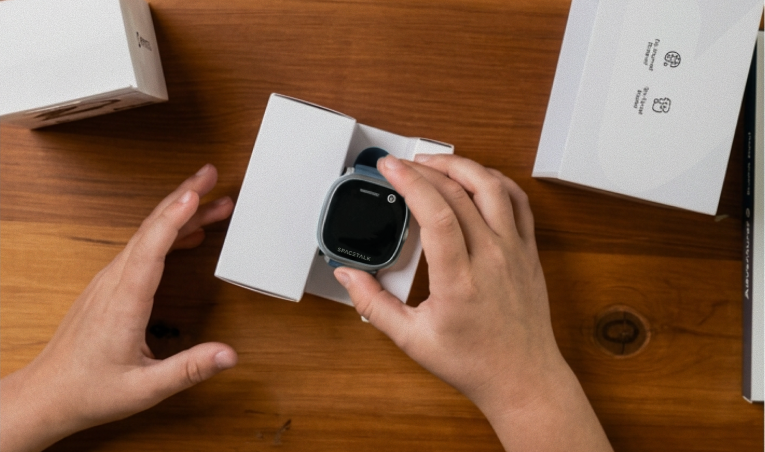
You found the watch, got it into the trolley before it sold out, and now it's sitting somewhere in the house with about four weeks to go until Christmas morning. That's a good problem to have.
Buying Christmas gifts early feels like a win right up until you actually have to live with a wrapped Spacetalk Watch in the house without your kid finding it, the battery running flat, or nobody getting around to setting up the app before the 24th.
Here's how to keep everything ready between now and the big day, so the only surprise on Christmas morning is the good one.
A Spacetalk Watch bought in the Black Friday sales is going to sit around the house for the best part of a month before it's opened. That's plenty of time for a curious kid to stumble across it, a battery to run flat, or a box to get squashed under something heavier at the back of a cupboard.
None of that is a problem if you plan for it now, rather than remembering on Christmas Eve.
A wardrobe shelf, the top of the linen cupboard, or a lockable drawer all work better than anywhere warm or damp, like a garage in the middle of an Australian summer. Heat isn't great for batteries, so normal room temperature is the goal.
The real test for hiding Christmas presents is picking somewhere your kid has no reason to go looking. Wherever the wrapping paper and the other gifts are hiding, keep this one with them.
You can leave the box sealed until Christmas morning, or open it now to check everything's there and reseal it with a strip of tape. Opening it early makes sense if you want to charge the watch or set up the app ahead of time, and most kids won't give a re-taped box a second look.

Spacetalk Watch accessories like a spare strap, a charging stand and a screen protector aren't essential, but they're what turns "a watch in a box" into a gift that feels finished.
If you know your kid's favourite colour, wrapping a second strap alongside the watch means they can switch it up the same day. It's also a small, easy stocking-filler if you're topping up the main gift.
A charging stand and screen protector are easy to lose track of if you bought them separately from the watch. Keep everything in one bag so nothing goes missing between now and the 25th, whether you picked up the Adventurer 2 accessories or the Loop range.
Opening a watch that already has a spare strap and a stand waiting on the kitchen bench makes the moment feel considered, not rushed. It also means there's no second Boxing Day trip to buy the things you forgot the first time.
The Spacetalk Adventurer 2 runs for up to 36 hours of active use on a full charge, with around three days on standby, so a watch sitting in a cupboard for a month isn't going anywhere near empty on its own.
Even so, give the kids smartwatch battery a proper charge two or three days before Christmas, using the magnetic USB-C charging cradle it comes with. That way it's sitting at a full charge, not whatever it was left at in November.
Nobody wants to explain to an excited seven-year-old why the watch needs an hour on the charger before it can be paired. A quick top-up a few days out avoids that entirely.
You don't need the watch in hand to download the Spacetalk App and create your Space. Working through the early steps on the Get Started guide now, entering your details and adding family members, means there's far less to do on Christmas morning itself.
Take some of the pressure off the day by deciding now who belongs on the Trusted Contacts list, so calls, Chat and SOS are ready to go the moment the watch is paired. Grandparents, the other parent, and a couple of close family friends are the usual starting point.

A watch bought early doesn't have to mean a month of half-remembered admin. Store it somewhere safe, keep the accessories together, give it a charge a few days out, and get the app sorted in the background.
That way, when your kid finally unwraps it, the only thing left to do is scan a QR code and start exploring what a Spacetalk Watch can actually do for your family.
Explore Spacetalk
Smartwatch · Kids
Spacetalk Adventurer 2
Runs for up to 36 hours of active use on a full charge, with around three days on standby.
Shop nowAccessories · Kids
Spacetalk Watch Accessories
A spare strap, a charging stand and a screen protector are the three that make the biggest difference on the day.
Shop nowApp · Family
Spacetalk App
You can download the Spacetalk App, create your Space and add Trusted Contacts before the watch is even out of the box.
Shop nowKeep it somewhere cool, dry and out of your kid's usual paths, like a wardrobe shelf or a lockable drawer, rather than a garage or anywhere that gets hot. Store the box the right way up and keep it with your other hidden gifts.
You don't need to charge it the moment it arrives, since the Spacetalk Watch holds its charge well on standby. Give it a proper charge two to three days before you hand it over so it's ready to pair straight away.
A spare strap, a charging stand and a screen protector are the three that make the biggest difference on the day. All three are available for the Adventurer 2 and Loop ranges and are easy to wrap alongside the watch.
Yes. You can download the Spacetalk App, create your Space and add Trusted Contacts before the watch is even out of the box. The watch itself is paired using a QR code once it's switched on, which only takes a couple of minutes on the day.
Love keeping up with Spacetalk?
Add us as your preferred source on Google and never miss a new post, product update or parenting tip.
Share:
Setting Up the Spacetalk App as a Family Safety App on iPhone
Choosing the Right Spacetalk Watch: From the Everyday Option to the Most Advanced Model