

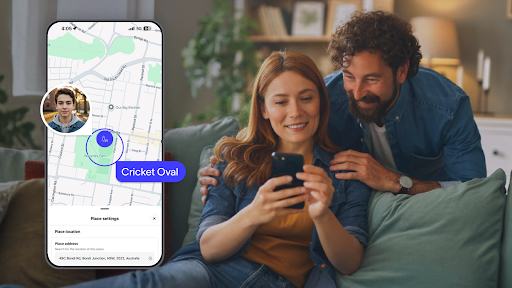
The Spacetalk App gives you a quiet, ambient sense of your kid's day without a stream of "where are you now" texts. A glance tells you they're at footy training. A ping tells you they've left Nan's. A little emoji tells you they're feeling great about their spelling test.
Most parents want to know their kid got to school, got to training, got home safely, but they're not ready to hand over a smartphone to make that happen.
A phone solves the whereabouts question and opens up a dozen others, from social media to screen time to a device that's too easy to lose. Spacetalk works differently. Here's what the app actually shows you across a normal day.

The most-used screen in the app is the map. Open it, and you'll see your kid's current location, updated on the schedule you set. The default is every 15 minutes, but you can pull it tighter if you'd like. Location awareness in the Spacetalk App has three layers:
The layering matters. On a school day, you're not glued to the map. You get a notification when they arrive at school, another when they leave, and another when they walk through the front door. The map is there when you want it and out of sight when you don't.

This is where the Spacetalk Watch differs from other devices parents consider. A basic Bluetooth tag clipped to a schoolbag tells you where the bag is, not how your kid is doing.
Other kids' smartwatches tend to swing the other way, throwing every ping, step and alert at you until the notifications blur into noise. Spacetalk sits in between, surfacing the moments that actually matter to a parent's day.
Your kid can tap the Feelings icon on their Spacetalk Smart Watch and pick an emoji that matches their mood. Happy, sad, excited, tired, and a few more. That emoji lands in your app, timestamped, alongside the rest of the day.
It sounds small, but it's not. For younger kids who don't always have the words for a tricky moment, a quick emoji is a lifeline back to you. Alongside Feelings, the app records:
Unlike a typical cell phone monitoring app that logs every text and every app open, the Spacetalk App shows you what your kid chose to share. It's the same visibility you'd have if they were standing next to you telling you about their day, just spread across the hours when they can't.
The Spacetalk Adventurer 2 has a built-in pedometer and heart rate sensor, and both feed into the app. You'll see:
The activity data is deliberately light-touch. Kids are wearing a smartwatch that happens to count steps in the background, and the app surfaces that data if it's useful to you.

Alongside activity, you can set up Rewards in the app. Assign stars for tasks such as making the bed, walking the dog, or packing the school bag, set the reward, and your kid can request a star from the watch when they've done the job.
It's a small gamification layer that turns the app into something the whole family engages with rather than a one-way monitoring tool.

The best test of any family safety tool is whether it makes your day quieter, not louder. If an app is pinging you every five minutes with data you didn't ask for, it's the wrong tool. If it's giving you the three or four moments that actually matter, it's doing its job.
The Spacetalk App is built around that principle. It's not trying to be one of the many apps to monitor kids' phones on the market, because most kids using Spacetalk don't have a phone yet.
It's the companion to a smartwatch that gives your kid their first real freedoms while keeping you in the loop.
And when the day comes that your teen is ready for a phone, the app keeps going. Same Spaces, same Places, same Chat threads. You skip the awkward transition from watch to some new cell phone monitoring app and just carry on with the tool your family already knows.
For most parents, that's the whole point. Not more data. Just the right data, at the right moment, in one place you actually check.
Explore Spacetalk
Smartwatch · Kids
Spacetalk Adventurer 2
4G calls, GPS tracking, SOS alerts and parent-managed safety on the Telstra network.
Shop nowApp · Family
Spacetalk App
Location, Feelings, Chat, activity and safety — your kid's whole day in one place.
Learn morePlans · Family
Spacetalk Mobile Plans
When your teen is ready for a phone, the same app keeps working.
Shop nowYou can see live location, arrival and departure alerts for the Places you've set up, Feelings emojis your kid has sent, Chat and SMS history, step count and activity data, and any SOS alerts. Everything appears in one feed, so a quick scroll gives you a full picture of the day without needing to open five separate screens.
Check-Ins are designed to be one-tap simple. Your kid opens the Feelings icon on their Spacetalk Watch, picks the emoji that matches their mood, and it sends straight to the app. For kids who are still learning to type or aren't confident on the watch keyboard, this is often the main way they'll stay in touch during the school day.
Yes. When your teen moves onto a Spacetalk Mobile Plan on their first smartphone, the same app keeps working. You retain location visibility and can still chat through the app, without needing a separate cell phone monitoring app on top.
Love keeping up with Spacetalk?
Add us as your preferred source on Google and never miss a new post, product update or parenting tip.
Share:
Monitoring Your kid's Safety Through the Spacetalk App on iPhone
What Australia's Under-16 Social Media Ban Means for Your Family