

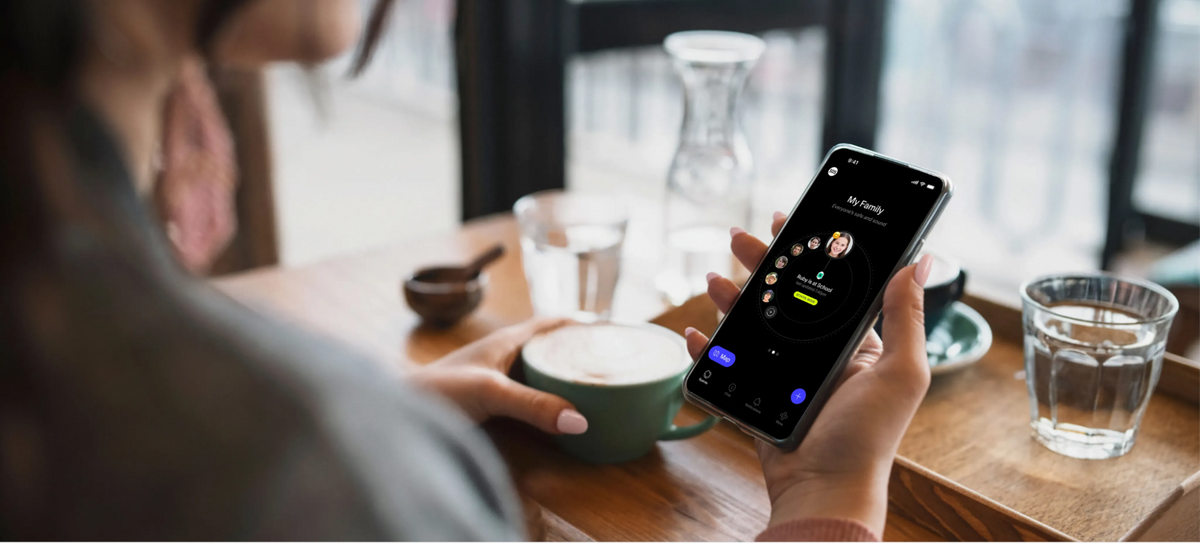
The Spacetalk App works as a family safety app first, and every feature inside it exists to keep your kids connected and protected at every stage of their day.
That difference matters more than it sounds. When safety is an afterthought, it shows up as a workaround.
When safety is the foundation, the whole app is designed around it, from who your kid can talk to, right through to how your family stays visible to each other without anyone having to check in constantly.
A family safety app is a platform built to give parents visibility and give kids room to move, without either one coming at the expense of the other. In the Spacetalk App, that shows up in a few deliberate design choices:

Everything in the Spacetalk App runs through a feature called a Space.
A Space is what makes location awareness, messaging and check-ins work together instead of sitting as separate, disconnected tools.
When you invite someone into your Space, you're not just adding a contact. You're giving them a defined role within the family's safety setup.
This structure is built for a single parent and a single kid, with everyone else locked out. A few things worth knowing about how Spaces work:
A genuine family safety platform has to work for everyone in the family, not just the person holding the parent login. The Spacetalk App is built with that in mind, and the experience looks different depending on who's using it.
For kids, the watch and app are deliberately simple. There's a camera, step counter, heart rate check, feelings check-ins, alarms and rewards set by parents, alongside the core safety tools. What's missing is just as intentional: no social feeds, no strangers, no open browsing. Kids get a device that feels like theirs, without the parts of the internet that weren't built with them in mind.
For parents, the app is the control centre. You can see location history, manage Trusted Contacts, set up Places and Routes, switch on School Mode for the school week, and get an SOS alert the moment it's triggered, all from one place rather than juggling separate apps for messaging, tracking and calling.
For grandparents and carers, a Spacetalk Smart Watch SIM or a spot in the family's space means they can stay genuinely connected, not just receive a forwarded update from a parent. A grandparent looking after the kids on a Wednesday afternoon can see the same location awareness a parent would, within whatever access level the family has set for them.
This is where the design choices earn their keep. It's not a kids' app with a parent's dashboard tacked on. It's a shared space where everyone involved in a kid's day, from the school gate to the grandparents' place, has the visibility they actually need.
Getting started with the Spacetalk App doesn't require a technical setup process or a long list of permissions to configure one by one. Download the app, create your family's Space, and start inviting the people who need to be part of it, whether that's your co-parent, a grandparent, a carer or an older sibling.
From there, add a Spacetalk Watch for a younger kid who isn't ready for a smartphone, or carry the same protections onto a Spacetalk Mobile Plan when they're older. Set Places for the spots that matter, like school and home. Approve Trusted Contacts. Switch on School Mode for the week ahead.
None of this is about locking your kid down. It's about building a foundation where freedom and safety aren't in competition, because the app was designed from day one to hold both at once.

Explore Spacetalk
App · Family
Spacetalk App
Trusted Contacts, Places, Routes, SOS and School Mode — one family safety app.
Learn moreSmartwatch · Kids
Spacetalk Adventurer 2
4G video calling, GPS, SOS and Chat in a closed, parent-managed environment.
Shop nowPlans · Family
Spacetalk Mobile Plans
Carry the same protections onto a smartphone when your kid is ready.
Shop nowIt's built around a closed, parent-managed contact list, real-time location awareness through Places and Routes, an SOS button and School Mode. Every feature exists to support connection and protection, rather than safety being added on afterwards.
No. A family's space can include grandparents, carers and other trusted adults, each with access tailored to their role. It's built for the way families actually share care, not just for a single parent managing a single kid.
A parental control tool typically restricts what a kid can do on one device. A family safety app connects the whole family - kids, parents, grandparents and carers - through shared location awareness, messaging and alerts, so visibility works both ways rather than being locked to one login.
Love keeping up with Spacetalk?
Add us as your preferred source on Google and never miss a new post, product update or parenting tip.
Share:
What Your Kid Actually Needs from a Smartwatch's Activity Tracking
How Does the Spacetalk App Combine Location, Chat, and Safety in One Family Safety App?